以下的代码为new Process() 调用cmd命令,并将结果异步回显到Form的例子:
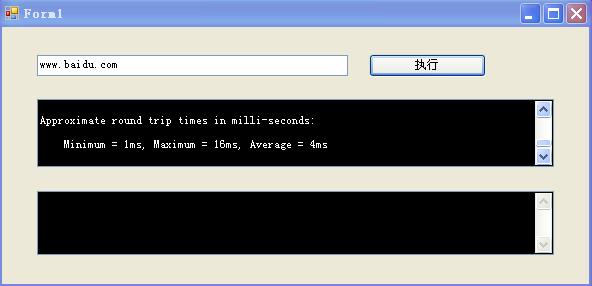
- using System;
- using System.Collections.Generic;
- using System.ComponentModel;
- using System.Data;
- using System.Drawing;
- using System.Linq;
- using System.Text;
- using System.Windows.Forms;
- using System.Diagnostics;
- namespace CmdCallbackShow
- {
- // 1.定义委托
- public delegate void DelReadStdOutput(string result);
- public delegate void DelReadErrOutput(string result);
- public partial class Form1 : Form
- {
- // 2.定义委托事件
- public event DelReadStdOutput ReadStdOutput;
- public event DelReadErrOutput ReadErrOutput;
- public Form1()
- {
- InitializeComponent();
- Init();
- }
- private void Init()
- {
- //3.将相应函数注册到委托事件中
- ReadStdOutput += new DelReadStdOutput(ReadStdOutputAction);
- ReadErrOutput += new DelReadErrOutput(ReadErrOutputAction);
- }
- private void button1_Click(object sender, EventArgs e)
- {
- // 启动进程执行相应命令,此例中以执行ping.exe为例
- RealAction(“ping.exe”, textBox1.Text);
- }
- private void RealAction(string StartFileName, string StartFileArg)
- {
- Process CmdProcess = new Process();
- CmdProcess.StartInfo.FileName = StartFileName; // 命令
- CmdProcess.StartInfo.Arguments = StartFileArg; // 参数
- CmdProcess.StartInfo.CreateNoWindow = true; // 不创建新窗口
- CmdProcess.StartInfo.UseShellExecute = false;
- CmdProcess.StartInfo.RedirectStandardInput = true; // 重定向输入
- CmdProcess.StartInfo.RedirectStandardOutput = true; // 重定向标准输出
- CmdProcess.StartInfo.RedirectStandardError = true; // 重定向错误输出
- //CmdProcess.StartInfo.WindowStyle = ProcessWindowStyle.Hidden;
- CmdProcess.OutputDataReceived += new DataReceivedEventHandler(p_OutputDataReceived);
- CmdProcess.ErrorDataReceived += new DataReceivedEventHandler(p_ErrorDataReceived);
- CmdProcess.EnableRaisingEvents = true; // 启用Exited事件
- CmdProcess.Exited += new EventHandler(CmdProcess_Exited); // 注册进程结束事件
- CmdProcess.Start();
- CmdProcess.BeginOutputReadLine();
- CmdProcess.BeginErrorReadLine();
- // 如果打开注释,则以同步方式执行命令,此例子中用Exited事件异步执行。
- // CmdProcess.WaitForExit();
- }
- private void p_OutputDataReceived(object sender, DataReceivedEventArgs e)
- {
- if (e.Data != null)
- {
- // 4. 异步调用,需要invoke
- this.Invoke(ReadStdOutput, new object[] { e.Data });
- }
- }
- private void p_ErrorDataReceived(object sender, DataReceivedEventArgs e)
- {
- if (e.Data != null)
- {
- this.Invoke(ReadErrOutput, new object[] { e.Data });
- }
- }
- private void ReadStdOutputAction(string result)
- {
- this.textBoxShowStdRet.AppendText(result + “\r\n”);
- }
- private void ReadErrOutputAction(string result)
- {
- this.textBoxShowErrRet.AppendText(result + “\r\n”);
- }
- private void CmdProcess_Exited(object sender, EventArgs e)
- {
- // 执行结束后触发
- }
- }
- }